Calmer days. Brighter tomorrows.

Healthy screen time.
Smarter kids.
Less daily conflict.

SteadyBounds helps parents set better boundaries, block distractions, and let kids earn extra time through meaningful STEM learning.

Built for busy parents. Designed for iPhone and iPad.
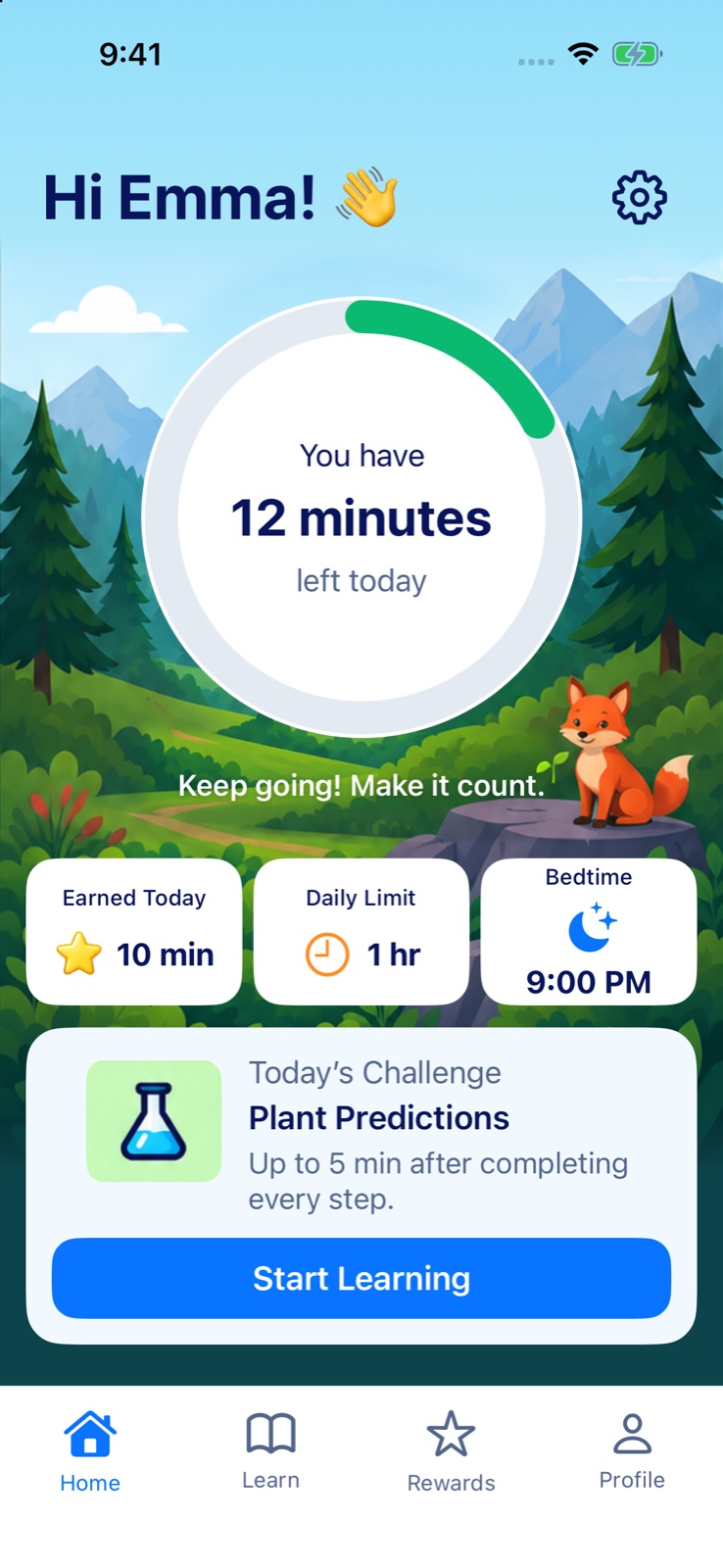
Child Home screen: Hi Emma, 12 minutes left today, 10 minutes earned, bedtime at 9:00 PM, and today's challenge.
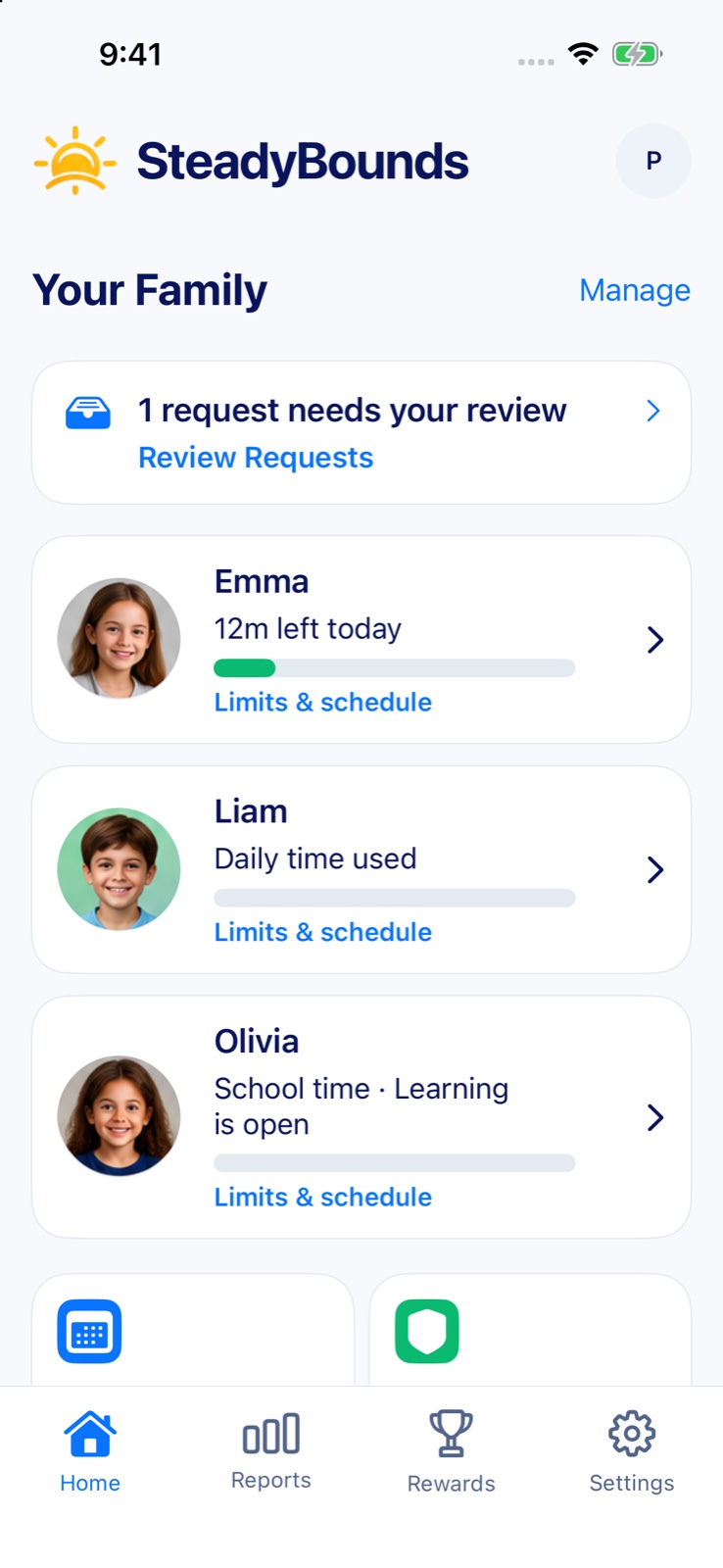
Parent Home screen: Your Family with each child's time left and a request waiting for review.
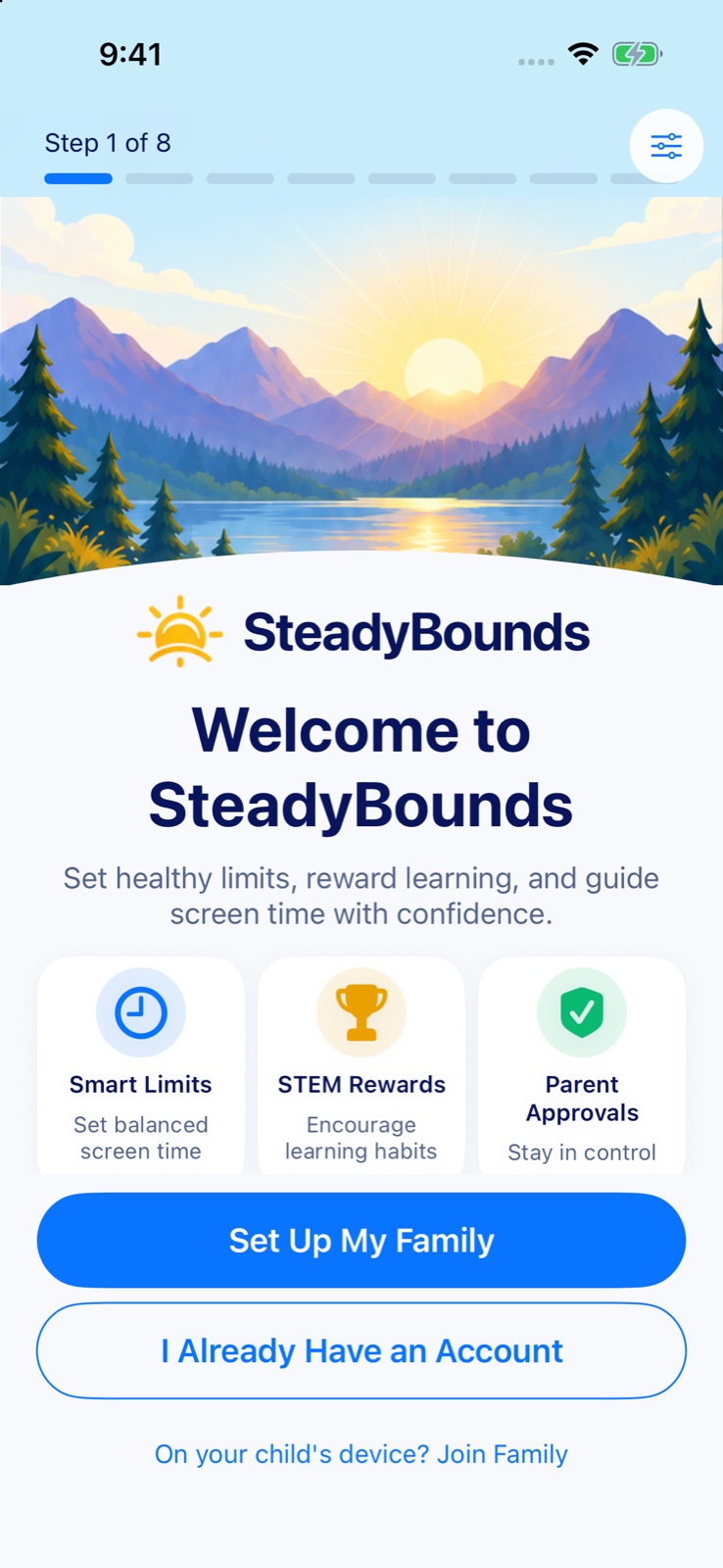
SteadyBounds welcome screen with Set Up My Family.

Smart Screen Time Limits

Set daily limits, bedtimes, and schedules that fit your family's routine.

Protected App Blocking

Block distracting apps and websites. Rules stay on, even when SteadyBounds is closed.

STEM Rewards

Kids earn limited extra time by finishing learning challenges and chores you approve.

Parent Approvals

Review time requests and handle exceptions with one-tap decisions.

How SteadyBounds Works

A simple, positive approach to screen time.

  1. 1

    Set family rules

    Choose daily limits, bedtimes, school hours, allowed apps, and more, right from your iPhone.

  2. 2

    Kids complete STEM challenges

    They learn through fun, age-appropriate activities in coding, math, science, and building.

  3. 3

    Earn time and stay on track

    Kids earn limited extra screen time, within caps you set, while building real skills.

Turn screen time
into learning time.

SteadyBounds' STEM library makes screen time something to feel good about. Kids earn extra time by finishing engaging, educational activities, and you decide how much they can earn.

  • Coding puzzles and logic games
  • Math quests and problem solving, from counting to algebra
  • Science activities and discovery
  • Engineering challenges and creative builds
  • Parent-approved offline tasks like reading and chores

Daily reward caps keep learning healthy.
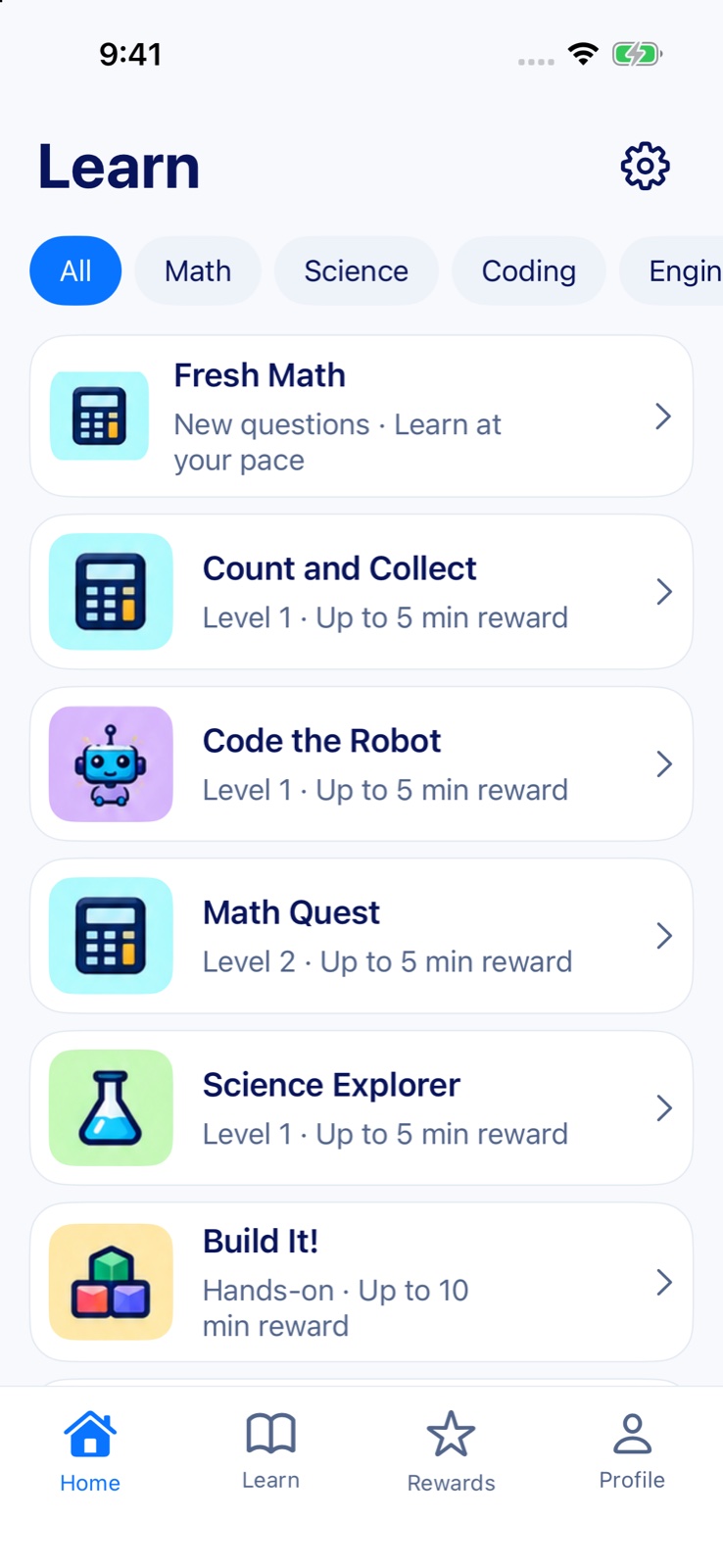
The Learn screen with subject filters and lessons: Fresh Math, Count and Collect, Code the Robot, Math Quest, Science Explorer and Build It!

See what matters. Skip the noise.

Get a clear view of your child's time, limits, and requests. SteadyBounds gives you simple oversight without spying, so you can guide, not hover.

  • Minutes left today12 min
  • Requests pending2
  • Earned today10 min
  • Bedtime starts at9:00 PM

Everything in SteadyBounds

All the tools you need to manage screen time, build healthy habits, and give your child more room to learn, play, and be themselves.

One allowance,
every device

Your child’s iPhone and iPad share one daily allowance, so more devices never means more screen time.

Learn more

Bedtime stays bedtime

Apps rest on schedule, and extra time never pushes bedtime back.

Learn more

Learning that
earns time

Short STEM activities with hints and read-aloud help. You set how much time they can earn each day.

Explore activities

Chores build
real-life skills

Create a task and choose the reward, from screen time to a trip to the park. Every reward waits for your OK.

See how it works

Only a parent
can add time

Kids can ask for more time, even when apps are locked. There’s no “One More Minute” button.

Every child,
every device, both parents

Invite another parent or guardian. No per-child or per-device fees.

See the big picture

Detailed reports show usage, trends, and progress.

Learn more

A calmer, happier home

Less conflict. More confidence. Tools that help you feel good about their digital habits.

See all 33 features

Limits & schedules 7

  • Daily limitsOne allowance shared across your child’s iPhone and iPad.Free
  • BedtimeApps rest on schedule, and extra time never moves bedtime.Free
  • School hoursGames stay closed while class is on.Free
  • App rulesYou pick which apps count. Apps you leave out, like Phone or Maps, keep working.Free
  • Website rulesBlock specific sites with Apple’s built-in web filter.Free
  • Pause and resumePause apps with one tap from wherever you are.Free
  • Regular breaksA short rest after a stretch of play, for example 15 minutes every hour.Free

Requests & extra time 6

  • Time requestsKids ask even when their apps are locked, without iMessage. You answer from your phone.Free
  • Extra timeAdd 5, 15 or 30 minutes to today in a couple of taps.Free
  • Time BankSave earned minutes for another day, up to the limits you set.Free
  • A lock screen that explainsIt names the rule holding the app, and it has no “One More Minute” button.Free
  • Confirmed changesYou see “Applied” only after your child’s device confirms the change.Free
  • Screen time reportsToday and the last 7 days, with most-used apps and websites.Free

Learning 8

  • Fresh MathFour-question sets with hints, from counting up through algebra.Free + Premium
  • Code the RobotStep-by-step coding and logic puzzles.Free + Premium
  • Science ExplorerMake a prediction, try it, and explain what happened.Free + Premium
  • Build It!Hands-on engineering challenges, with a grown-up nearby.Free + Premium
  • Daily challengeA fresh challenge on your child’s Home screen every day.Free
  • Read-aloud helpQuestions and hints read aloud. It never uses the microphone.Free
  • Earn time by learningUp to the daily cap you set. Each lesson pays once; repeats are practice.Free
  • Learning progress reportsSets finished, math topics and minutes earned, for each child.Premium

Family & rewards 8

  • Chores and family tasksScreen time or a real-world reward. Kids can’t pay themselves; you approve each one.Free
  • Chore routinesSave the chores your family repeats and assign them again.Premium
  • Family chat and groupsMessage the family or a small group. Anyone can report, block or mute.Premium
  • Both parents, one familyEither of you can approve requests and change rules.Free
  • Every child and deviceNo per-child or per-device fees.Free
  • Photos and avatarsPhotos are cropped and their location details removed before upload.Free
  • Home scenesForest is free. Space, Ocean and Clouds come with Premium.Free + Premium
  • Location sharingOptional, and off until you turn it on.Free

Privacy & control 4

  • No ads. No data selling.No ads, no ad tracking, and we don’t sell your family’s information.Always
  • We don’t read textsTexts, iMessage and conversations in other apps stay private.Always
  • Parent PINA PIN only you know protects SteadyBounds settings on your child’s device.Free
  • Remove it anytimeDisconnect a device whenever you choose, with or without a subscription.Free

Built around what parents asked for

We read hundreds of parent reviews of screen time apps. These are the problems that came up most, and how SteadyBounds handles them.

  • Kids tap “One More Minute” and keep going.

    Only a parent can add time.

    The SteadyBounds lock screen has no “One More Minute” or “Ignore Limit” button.

  • Every device gets its own full hour.

    One allowance across iPhone and iPad.

    An hour means an hour, however many devices your child uses.

  • Asking for more time needs iMessage.

    Requests work even when apps are locked.

    Kids ask inside SteadyBounds, and you answer from your phone.

  • The app said unlocked. It wasn't.

    “Applied” means applied.

    You see Applied only after your child's device confirms the change.

  • Kids tick off chores they never did.

    Kids can't pay themselves.

    Every chore reward waits for a parent's OK.

  • The basics were stuck behind a paywall.

    Screen time controls are free.

    Limits, approvals, extra time, and reports never need a subscription. If Premium ends, your rules keep working.

Simple, Transparent Pricing

Start free. Upgrade when your family wants more to learn and less to juggle.

Free

$0

Free forever

  • Every screen time control
  • Requests, approvals, and extra time
  • Time Bank and screen time reports
  • Starter lessons at every level
  • Daily challenge and chores
  • Every child, device, and parent
Start Free
Best value

Premium

$49.99/year

$4.17 a month · Save 30% · 14 days free

$5.99/month

Billed monthly · Cancel anytime

  • Everything in Free
  • Full lesson library and extra practice
  • Family chat and groups
  • Chore routines
  • Space, Ocean, and Cloud Home scenes
  • Learning progress reports
Try 14 Days Free Get Premium

Premium is an optional auto-renewing subscription billed to your Apple Account. It renews automatically unless you turn off auto-renew at least 24 hours before the current period ends; manage or cancel anytime in your iPhone's Settings. The 14-day free trial is for eligible new subscribers to the yearly plan; cancel before it ends and you won't be charged. U.S. prices shown; prices vary by country. Your screen time controls keep working without a subscription. See the Terms of Use and subscription and refund details.

Frequently Asked Questions

Can my child just close the app?

Closing SteadyBounds doesn't turn anything off. Your rules are applied through Apple's Screen Time system and stay in place whether or not the app is open. If protection on a device stops working, the parent app shows that the device needs attention.

How do rewards work?

Kids finish lessons, the daily challenge, or chores you create. Each can earn the minutes you allow, up to a daily cap you choose. Chore rewards always need your approval, and each lesson pays once.

Can I keep school apps available?

Yes. You choose which apps are limited. Apps you don't select, such as school apps, Phone, or Maps, keep working, and school hours keep games closed while class is on.

Does it work for more than one child?

Yes. Add every child and each of their iPhones and iPads at no extra cost. Each child has their own rules, learning level, and rewards, and each child's devices share one daily allowance.

Is SteadyBounds really free?

Yes. Every screen time control is free: limits, bedtimes, app and website rules, requests, extra time, Time Bank, and reports. Premium is optional and adds the full lesson library, family chat, chore routines, extra Home scenes, and learning progress reports.

What does my child's device need?

An iPhone or iPad on iOS or iPadOS 17.4 or later, signed in with your child's own Apple Account in your Family Sharing group. During setup you approve Apple's Screen Time permission on your child's device. No computer, profile, or VPN is needed.

Can SteadyBounds read my child's messages?

No. It can't read texts, iMessage, email, or conversations in other apps, and it doesn't collect browsing history. Family chat inside SteadyBounds is separate and optional.

Can I remove SteadyBounds later?

Yes, whenever you like, with or without a subscription. Disconnect your child's device in the parent app and SteadyBounds takes its rules off that device. Premium is cancelled separately in your iPhone's Settings. See the steps on our Support page.

Does SteadyBounds replace supervision?

No. It's a tool that helps you set and keep limits. Kids still need a grown-up's guidance, and no app can promise that every rule can't be worked around. Please read our safety and parent responsibility notes.

Create healthier habits with SteadyBounds.

Happier today. Brighter tomorrows.